Data Analysis Software
Win Darab, explained.
Free vs. Expert, licensing, the API, and how to actually set it up.
WinDarab is the tool most Bosch-equipped race teams use to turn logged data into lap time. This page covers what it does, what's different between the Free and Expert versions, how the 3-PC license works, and the exact setup steps once your license lands, including the one step almost everyone forgets.
Overview
What WinDarab actually does
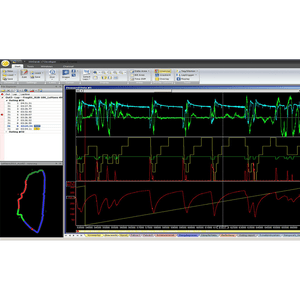
WinDarab V7 is Bosch Motorsport's evaluation tool for logged and live vehicle data. It reads out both engine and chassis channels from your Bosch hardware, lets you overlay laps against each other, builds custom math channels from raw sensor data, and can display telemetry live while the car is on track.
It pulls data straight from Bosch data loggers (C 70, C 80, and similar), ECUs (MS 6, MS 7, and similar), and displays (DDU 9, DDU 10, and similar) over Ethernet, USB, or CF-Card. If you're running non-Bosch hardware, WinDarab can still import and analyze ASCII or MDF files from those systems, so you're not locked out of using it just because part of your car isn't Bosch.
Every WinDarab license, whether Free or Expert, includes the full diagram, analysis, and racetrack generation toolset. The difference between the two versions comes down to how much of it you get, not which features exist. See the full breakdown below.
At a glance
- No hardware dongle required, on any version
- Imports ASCII / MDF from non-Bosch systems
- Fully backward-compatible with older WinDarab files
- License activation is done online, not by mail
- Windows 7/10, 1.6GHz CPU, 1GB RAM, 1GB storage minimum
Free vs. Expert
Which version do you need?
WinDarab Free covers the essentials of data review. Expert removes every limit and unlocks the tools race engineers actually live in day to day: lap analysis, flowcharts, and full math-channel authoring.
| Feature | Free | Expert |
|---|---|---|
| Max. open files | 4 | Unlimited |
| Max. measuring data windows | 2 | Unlimited |
| Max. areas per data window | 4 | Unlimited |
| Histogram | Yes | Yes |
| x/y-plot | Yes | Yes |
| Distribution | Yes | Yes |
| Min/Max tables | Yes | Yes |
| Fourier transformation | Yes | Yes |
| Outing report | Yes | Yes |
| Lap analysis | No | Yes |
| Flowcharts | No | Yes |
| Instrument panel | Yes | Yes |
| User-defined physical units | Yes | Yes |
| Racetrack generation (speed/G or GPS) | Yes | Yes |
| ASCII export | Yes | Yes |
| Math channel operators | Basic (+ − × ÷ ^ sqr sqrt) | All operators |
| Extras settings / comments | No | Yes |
| Desktop load / save | Yes | Yes |
| Telemetry | Yes | Yes |
| Programming interface (API) | No | Optional add-on |
Licensing
How the Expert license actually works
This is the part we get the most calls about, so here's exactly how it's structured.
3 PCs, installed natively
Once your Expert license is issued, it can be activated on up to 3 computers. It lives on those specific machines. It isn't a portable dongle or a cloud login, so you can't just open WinDarab on a laptop that isn't one of your 3 registered installs.
Need to swap to a 4th machine? One of the existing 3 has to be deactivated first through the License Manager.
Damaged trackside PC
If one of your 3 licensed computers gets destroyed, stolen, or otherwise can't be recovered at the track, that's not the end of the seat. Contact us and we can have your license reset so it can be reinstalled on a replacement machine.
This isn't instant or automatic, so reach out as soon as it happens and we'll get you back up and running.
Annual update eligibility
Your license includes free upgrades to any new WinDarab version for 365 days from your issue date. After that, your software doesn't stop working. You keep permanent use of whatever version you're on.
Want to move to a newer version after the year is up? A Maintenance Update renews upgrade eligibility for another 365 days, at roughly 20% of a full Expert license.
Purchase
WinDarab licenses

WinDarab 7 Expert License
Full-featured Expert software, valid on 3 PCs, with a year of update eligibility included.

WinDarab 7 Maintenance Update
Extends your existing Expert license's update eligibility another 365 days. Requires proof of an active Expert license.

WinDarab V7 API License
COM-API access for building custom plugins and external integrations. Requires an active Expert license. Renews yearly.
API Add-on
What does the WinDarab API actually give you?
The COM-API gives outside software controlled access to WinDarab itself, not just its data. It lets another application attach to (or launch) a running WinDarab instance, read its data domain, track cursor position and view range, and read marked or tagged ranges.
- Build custom plugins with their own buttons and menus on the WinDarab ribbon
- Run automated report or export tools alongside WinDarab
- Create new WinDarab-format measurement files (v2, WinDarab 7.6+) populated with your own application's channel data
- Connect any third-party tool that needs to talk to WinDarab in real time
The API only works with WinDarab Expert. It will not function on the Free version.
It's licensed and billed separately from your Expert license, on an annual basis, and needs to be renewed each year to keep working.
After You Purchase
Setting up WinDarab, step by step
Once you order an Expert license, Bosch typically issues the key within 1 business day. Here's the full process from download to your first analysis session.
Download WinDarab
Grab the current installer while you wait on your license key. There's no need to wait for the key to arrive before installing the software itself.
Install the Bosch Motorsport License Manager
This is a separate, required application. Your license will not activate without it. Install and run it before attempting to enter your license key.
Activate your license
Once your key arrives (usually within 1 business day of purchase), open WinDarab and go to Start → Tools → Update License. Activation requires a working internet connection.
Configure your firewall
Corporate or track-network firewalls can occasionally block WinDarab's local data transfer. If telemetry or logger reads aren't connecting, check your firewall configuration against the manual.
Set up your Special Channels
WinDarab relies on a short list of "special channels," like distance, lateral acceleration, and GPS position, to power features like racetrack generation, lap timing, and reports. Out of the box, these aren't mapped to your car's actual channel names. Have your engineer go to Program → Special Channels tab, scroll through the list, and assign each one to the matching channel from your car's dataset. Skipping this is the single most common reason lap timing and reports don't work correctly.

FAQ
Common questions
Q. How long does it take to get my license key after I purchase?
Q. Can I install WinDarab on more than 3 computers?
Q. What happens if my laptop is destroyed at the track?
Q. Do I need internet access to activate my license?
Q. Can I open data from non-Bosch hardware?
Q. Will older WinDarab data still open in the newest version?
Q. What happens to the data on my logger after I import it?
Q. Do I need a hardware dongle?
Still have questions?
Call us at (386) 333-9543 or email Sales@GoMuchFaster.com. We've set up hundreds of WinDarab licenses and are happy to help.
Email Us